We've moved!
Check out News from Google
for all the latest updates.
Official Blog
Insights from Googlers into our products, technology, and the Google culture
#IRegistered to vote. Have you?
26 de septiembre de 2016
¡Hola! Desplazarse hacia abajo para leer este mensaje en español -Ed.
On the eve of National Voter Registration Day, we’re doing our part to encourage American voters to get registered for the 2016 election. We've already added in-depth information in Search for
registration
and
how to vote
, and now we're adding this same information in
Spanish
. Now both Spanish and English speakers will be able to get custom, state-by-state information on key registration deadlines, when to get to the polls, and even steps on how to vote early or by mail. We hope this feature helps simplify the registration process for more American voters.
By helping more people get registered, we're also helping ensure more people get to the polls and vote. The majority of Americans who register to vote end up voting — according to the
US Census Bureau
, in 2012, 86 percent of those who registered also voted in the November election.
Today's Google Doodle encourages people to get registered in time for National Voter Registration Day
YouTube creators also want you to
head to the polls and #voteIRL
. Tune in to
this playlist
to see how you can register to vote in the amount of time it takes
Ryan Seacrest to host a radio show
or
The Fung Bros to shoot hoops
. Surprising fact: it only takes one minute and 34 seconds! Once you’ve registered, join us in encouraging others along the voting process by sharing a post with #IRegistered on social media.
Registering to vote is just the first step toward casting your ballot in this year’s election. We hope that you’ll be inspired to learn more about the candidates, the issues, and the voting process — and make your voice heard in 2016!
Posted by Jonathan Betz, Engineering Manager, Civic Engagement
_________________________________________________________________________________
Yo me registre para votar. ¿Y tu? #IRegistered
En la víspera del Día Nacional de Registro de Votantes, estamos haciendo nuestra parte para animar a los votantes estadounidenses para registrarse para las elecciones del 2016. Ya hemos añadido información detallada en búsqueda de como
registrarte
y
cómo votar
, y ahora estamos añadiendo esa misma información en
español
.
Ahora, tanto los hablantes de español e inglés podrán obtener información personalizada, estado por estado sobre las fechas clave de registro, horarios para llegar a las urnas, e incluso los pasos necesarios para votar temprano o por correo. Esperamos que esta función ayude a simplificar el proceso de registro para más votantes estadounidenses.
Al ayudar a que más personas se registren, también estamos ayudando a asegurar que más personas lleguen a las urnas y voten. La mayoría de los estadounidenses que se registran para votar terminan ejerciendo su voto - según la
Oficina del Censo de Estados Unidos
, en el año 2012, el 86 por ciento de los que se registraron también votaron en las elecciones de noviembre.
El Google Doodle de hoy anima a la gente para que se registren a tiempo como parte del Día Nacional de Registro de Votantes
Los creadores de YouTube también quieren que
acudas a las urnas y voten en vida real con la campaña #voteIRL
. Te recomendamos sintonizar esta lista de
videos
para aprender cómo puedes registrarte para votar casi en la misma cantidad de tiempo que le toma a
Ryan Seacrest presentar su programa de radio
o a los
Fung Bros
jugar baloncesto. De hecho, te sorprenderá saber que: ¡sólo te tomará un minuto y 34 segundos! Una vez que te hayas registrado, te invitamos a acompañarnos a animar a otros a lo largo del proceso de votar, compartiendo un post utilizando #IRegistered en tus redes sociales.
Registrarse para votar es sólo el primer paso para emitir tu voto en las elecciones de este año. ¡Esperamos que te inspires a aprender más sobre los candidatos, los temas, y el proceso de votación - y al mismo tiempo hacer oír tu voz en el 2016!
Publicado por Jonathan Betz, Gerente de Ingeniería, Participación Cívica
https://blogger.googleusercontent.com/img/b/R29vZ2xl/AVvXsEhZUBBTyoEDRTsuLoMJVbUldACGTpybM8uXyhAHjFOitoVt2bEcMzu5-9rxHmasZEs7oojgaONg9uWF7qK-ymjAM19XBVPXa-7XCUlp8xBA8golsyOQILDAEkdqfNBch4FG7xA9/s1600/Google_IRegistered.jpg
Jonathan Betz
Engineering Manager
Civic Engagement
Change is Made with Code
21 de septiembre de 2016
What would the world look like if only 20 percent of women knew how to write? How many fewer great books would there be? How many important stories would go unreported? How many innovations would we lose? How many brilliant women would be unable to fulfill their potential?
That’s not just a theoretical question. Today, only a small minority of women know how to write code. That limits their ability to participate in a growing part of our global economy. It limits their ability to affect change as entire industries are transformed by technology. And it limits their potential to impact millions of lives through the power of code.
To change this trajectory, we need to do all we can to inspire women and girls that learning to code is critical to creating a brighter future for everyone. That’s why I’m excited to share that, today, Google’s Made with Code, together with YouTube, is teaming up with the
Global Citizen Festival
and millions of teen girls to ignite a movement for young women to change the world through the power of code.
Over the last five years, millions of Global Citizens have influenced world leaders and decision makers, and contributed to shaping our world for the better. As we’ve seen this movement grow, we’ve learned about some incredible women who saw problems in their communities and realized that the biggest impact they could have was through computer science. They’ve used an interest in computer science and tech to help the homeless, stop sexual assault, and bridge the gender gap in technology - check out their stories here:
These women are doing big things, blazing a path for the next generation of girls, but they can’t do it alone. The vast potential around using code to improve the world cannot be realized if there are only a few voices influencing how it’s shaped. That’s why, today, we’re inviting teen girls everywhere to join the movement. Our
new coding project
gives young women a chance to make their voice heard by coding a statement about the change they want to see in the world.
This week, hundreds of thousands of girls from around the country have already used code to share their vision for a better, more inclusive, more equitable world:
These coded designs will be displayed onstage at the Global Citizen Festival, as symbols of the many different voices from teen girls, standing up for the change they want to see in the world.
Together with musicians, sisters, YouTube sensations and newly minted coders,
Chloe x Halle
, teen girls are getting their start in code
Our efforts go well beyond this project. Made with Code is joining forces with Iridescent and UN Women to support the launch of the
Technovation Challenge 2017
which gives girls the opportunity to build their own apps that tackle the real-life issues they see around them.
Please tune into the
Global Citizen Festival livestream at youtube.com/globalcitizen
on September 24 to catch all the action. And, more importantly, join us and encourage the young women in your life to try out coding and contribute their ideas for how to make a better future.
Posted by Susan Wojcicki, CEO, YouTube
https://blogger.googleusercontent.com/img/b/R29vZ2xl/AVvXsEgzjQ0XDQJZXLSYFXc2VredAld3pLLpqpzgk-JNfiJFVCnut4797aV3a8C0BsA9Q7i9yUSK8N2qvUC3yfYGblidNnuBcSvngxp2pUY93LCJ_Mw48fB131VH1rNNq1QBRar9wU-3/s1600/Screen+Shot+2016-09-21+at+9.38.06+AM.png
Susan Wojcicki
CEO
YouTube
Say hello to Google Allo: a smarter messaging app
20 de septiembre de 2016
Whether it’s planning a night out or just catching up, we all rely on messaging to stay in touch with friends and loved ones. But too often we have to hit pause on our conversations — whether it’s to check the status of a flight or look up that new restaurant. So we created a messaging app that helps you keep your conversation going, by providing assistance when you need it.
Today, we’re releasing
Google Allo
, a new smart messaging app for Android and iOS that helps you say more and do more right in your chats. Google Allo can help you make plans, find information, and express yourself more easily in chat. And the more you use it, the more it improves over time.
Respond quickly with Smart Reply
Google Allo makes it easier for you to respond quickly and keep the conversation going, even when you’re on the go. With Smart Reply, you can respond to messages with just a tap, so you can send a quick “yup” in response to a friend asking “Are you on your way?” Smart Reply will also suggest responses for photos. If your friend sends you a photo of their pet, you might see Smart Reply suggestions like “aww cute!” And whether you’re a “haha” or “😂” kind of person, Smart Reply will improve over time and adjust to your style.
Express yourself with photos, emojis and stickers
Chat is more than just text, so we’ve created a rich canvas for you to express yourself in Google Allo. You can make emojis and text larger or smaller in size by simply dragging the “send” button up or down. Make photos your own by scribbling on them before you send. And we’ve worked with independent artists and studios around the world to create more than 25 custom sticker packs, because sometimes a “sloth riding a pizza” says it all.
Meet your personal Google Assistant
In Google Allo you’ll also be introduced to a preview edition of the
Google Assistant
. With your Assistant in Allo, you can have a conversation with Google — ask it questions and let it help you get things done directly in your chats. You no longer need to leave a conversation with friends just to grab an address, share your favorite YouTube video, or pick a dinner spot. Just type @google to bring your Assistant into any group chat. And of course, you can also chat one-one-one with your Assistant in Allo.
Here are just a few ways your Google Assistant can help in Google Allo:
Make plans with friends.
You can easily move from discussing dinner with friends to making plans for the night, right in your chat. Just add the Assistant to your group chat and ask for movie times, local restaurants and more. You can also research travel destinations, flights and hotels together with friends.
Get answers.
Get the latest info on everything from news, weather, traffic, sports, or your upcoming flights status. Ask the Assistant to send you daily updates on the information you care about.
Have some fun.
Ask your Assistant to share that funny YouTube video or play games with friends right in your group chat — for instance you can compete to guess a movie title based on a series of emojis.
The Google Assistant is the next chapter in a journey Google has been on for many years to assist people in their everyday lives. We’re starting with a preview edition to show you just one way that your Assistant will work for you in chat. Over the coming months, your Assistant will be available in more Google products, working seamlessly throughout your day at home or on the go. The Assistant will initially be available in English, with more languages coming soon.
Chat in Incognito mode
We take privacy and security seriously in Google Allo. All chats in Google Allo are encrypted using industry standard technologies like
Transport Layer Security
(TLS). But we went a step beyond this and we created a mode within Google Allo called
Incognito
(h/t
Chrome
). When you chat in Incognito mode, messages have end-to-end encryption and additional privacy features like discreet notifications and message expiration.
You can also message friends who aren’t yet using Google Allo through
SMS
or, for those using Android,
app preview messages
.
We can’t wait for you to say hello to Google Allo! We’re beginning to roll out Google Allo for
Android
and
iOS
, and the app will be available worldwide in the next few days.
Posted by Amit Fulay, Group Product Manager
https://blogger.googleusercontent.com/img/b/R29vZ2xl/AVvXsEh3R0xFVumQqO6ZIhhr7ZfKGK8yoDxPQrbeBajvaK2KYTccNS6NfbhTbd6qKXvRyLbtcmVeneXVxm0RHHLQnZh19C0KYklkVEWSQ9At29WE6jT187FnsjS2s2m4fVhASwdkRKf2/s1600/Screen+Shot+2016-09-20+at+10.55.14+PM.png
Amit Fulay
Group Product Manager
Google
Bringing education to refugees in Lebanon with the Clooney Foundation for Justice
20 de septiembre de 2016
The world is facing the largest refugee crisis since World War II. Last September,
we invited people
around the world to help us in supporting organizations on the ground — with Google.org matching every dollar. Since that time, Google.org has committed more than $16.5 million to refugee relief efforts, focused on immediate humanitarian assistance, information and connectivity, and education.
Clooney Foundation for Justice Grant
Today, we’re supporting the
Clooney Foundation for Justice
with a $1 million grant focused on education for refugee children in Lebanon. More than half of global refugees are under the age of eighteen, and in Lebanon, which is hosting the
largest number of Syrian refugees per capita
in the world, nearly half of those are Syrian refugee children who are
currently out of school
.
The Clooney Foundation for Justice is teaming up with
SABIS
, a global education network that has already taught many refugee children in Lebanon. SABIS is taking its accredited teaching methodology and making it accessible to more refugees in Lebanon by setting up semi-permanent schools in areas with a high concentration of refugee children. This grant will support expanding their efforts to develop a new school model, using digital tools, for up to 10,000 out-of-school children in Lebanon. Through our employee volunteering program, we’ll also provide technical expertise to help with everything from connectivity to cloud storage by having Googlers helping both on the ground and remotely.
This grant builds on
our work with organizations
who also support refugees in Germany, France, Turkey and Greece with access to education and learning opportunities. Collectively, our efforts across humanitarian assistance, connectivity and access to information and education will help more than 1 million refugees.
Information and Connectivity
In October 2015, we granted NetHope $900,000, and our employees from around the world helped set up WiFi hotspots and charging kits at key transit points along the refugee route in Europe. So far, more than 300,000 refugees have been able to access NetHope’s WiFi to access vital information. Googlers also helped build the site
RefugeeInfo.eu
with the International Rescue Committee, Mercy Corps, and others. The site is now accessible in 18 locations in Greece, Italy, Germany, Slovenia, Croatia and Serbia, and is being used more than 1,000 times a day.
We’re also working to help refugees in the United States get mobile connectivity by partnering with the International Rescue Committee to donate 1,000 Nexus devices and Project Fi wireless service to refugees in 24 cities across the country.
Education
In January
, together with NetHope, we launched “
Project Reconnect
” — an effort to to equip German NGOs with 25,000 Chromebooks that
help refugees
learn more about local languages, resources, and job opportunities. To date, more than half of them have been delivered and used by nonprofits in Germany. Last year, we also gave a grant to Libraries without Borders to send their
Ideas Boxes
to create safe learning and playing spaces for children in refugee camps. These Ideas Boxes have been visited thousands of times in camps from Lesbos and Athens in Greece to the refugee camp of Grande Synthe in France and in Düsseldorf, Germany.
Discovering the resources of the Ideas Box in the Eleonas refugee camp, in Athens, Greece
A White House call to action
In June, we signed on as a
founding partner
of the White House’s Private Sector Call to Action for Refugees, an effort by the administration to bring together a cross-section of businesses to help make significant commitments that will have a measurable impact on refugees both in the United States and around the world. We’re participating in the conversation at the White House Summit on Refugees today in New York, and will continue to build on our efforts.
You can learn more about grantees and their work at
google.org/refugees
, and you can donate directly on our site and via the White House’s
AidRefugees.gov
.
Posted by Jacquelline Fuller, Director, Google.org
https://blogger.googleusercontent.com/img/b/R29vZ2xl/AVvXsEgUUGhPjQbCPs2GwAhUwSi0lk1_yopiKqxHjhNXe0dNNKX5UAKVaYeiZ8QpU6s6mHe9hrT-Vfuki_9iVsUIVAGr71TfUdqWCjvMG2EFRcsJR3owc519_INCyb5uSeUYe2zNaXn2/s1600/Screen+Shot+2016-09-19+at+5.28.26+PM.png
Jacquelline Fuller
Director
Google.org
A faster way to share photos and videos, and all-new movies
19 de septiembre de 2016
Sharing all the photos from your weekend with friends can be hard: Not everyone uses the same apps, texting can be slow, and email has attachment limits.
Now, with Google Photos, you pick the photos, tap “share” and select the people you want to share with, instead of the apps — and we take care of the rest. If your friends are on Google Photos, they’ll get a notification. If you share via phone number, they’ll get a link to the photos and videos via SMS. And email addresses will get an email with a link from Google Photos. So you can spend less time toggling from app to app to share photos — dealing with failed texts or email attachment limits along the way — and more time enjoying life’s photo-worthy moments.
We’re also upping our game when it comes to automatic creations. Google Photos has always made movies for you using your recently uploaded photos. Now we’re going further, with new movies that are based on creative concepts — the kinds of movies you might make yourself, if you just had the time. And they’re not only limited to your most recent uploads.
One of the first concepts is designed to show your child growing up right before your eyes. Here’s an example:
We’re rolling out a couple more concepts this week, with more coming soon. Look out for a concept to commemorate the good times from this summer, and another one for formal events like weddings. And you don’t need to do a thing — these movies get made automatically for you.
These updates are rolling out today across
Android
,
iOS
, and the
web
.
Posted by David Lieb, Product Lead, Google Photos
https://blogger.googleusercontent.com/img/b/R29vZ2xl/AVvXsEhvdXh-GJXO0GMolTySvufHHgYGp_l1DHyBRIi7RegM4ImhNNYuIUWEwTpv8g2X2NrKK3cDwVaGUV26HGSFZjOg97DJOcl0wXYtdQd8Gc86Q_57LqqF4ajZKdDPJhY3vrBP27xq/s1600/Screen+Shot+2016-09-19+at+9.55.02+AM
David Lieb
Product Lead
Google Photos
See more, plan less – try Google Trips
19 de septiembre de 2016
Whether you’re juggling work, school, family, or just the demands of daily life, everyone needs a little break and a new adventure sometimes.
But knowing what to do once your vacation starts can turn what’s supposed to be fun into a lot of work. You might get recommendations from friends, professional travel guides, or online reviews — but figuring out how to squeeze everything you want to do into a finite window of time can be stressful, especially when you’re in a new place, often with limited access to the web. In fact, a
GoodThink study
showed that 74% of travelers feel the most stressful aspect of travel is figuring out the details.
We wanted to reduce the hassle and help travelers enjoy their hard-earned vacations. So today, we’re introducing a new mobile app to help you instantly plan each day of your trip with just a few taps of your finger:
Google Trips
.
Google Trips is a personalized tour guide in your pocket. Each trip contains key categories of information, including day plans, reservations, things to do, food & drink, and more, so you have everything you need at your fingertips. The entire app is available offline — simply tap the “Download” button under each trip to save it to your phone.
Choose your own adventure
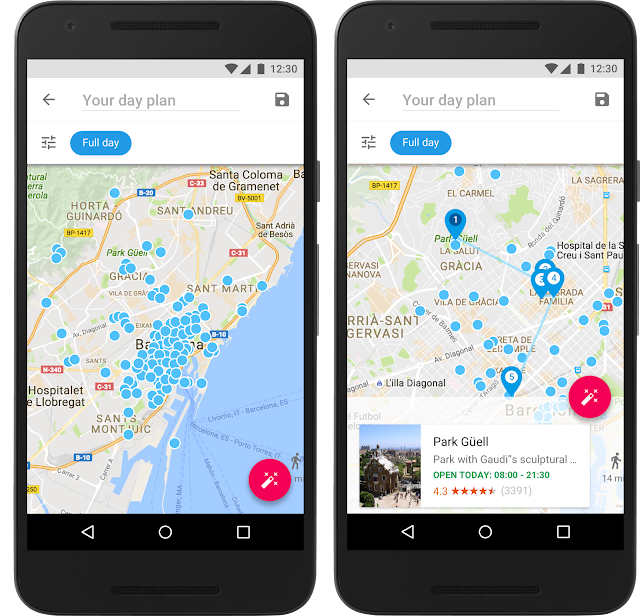
For the top 200 cities in the world, Google Trips shows you a variety of day plans featuring the most popular daily itineraries. We’ve automatically assembled the most popular sights, attractions, and local gems into a full day’s tour — all based on historic visits by other travelers. Say you’re visiting Barcelona. You can choose from multiple day plans, like “Eixample District,” which maps out the can’t-miss buildings by Antoni Gaudi, the famous Spanish architect.
Plan each day of your trip like magic
Everyone has different interests and time constraints. No matter how popular an itinerary is, there’s no one-size-fits-all solution for the perfect day or the perfect trip. Google Trips can help you build your day around places you already know you want to visit.
Say your friends told you that you have to see the Sagrada Familia — and you’re looking for suggestions on things to do around that spot. Press the “+” button in the day plans tile to jump into a map view containing all the top attractions in your destination. If you’re time constrained, you can specify above the map whether you have just the morning or afternoon, versus a full day. Then simply tap and pin the Sagrada Familia to build your itinerary around it. Google Trips automatically fills in the day for you. If you want more options, tap the “magic wand” button for more nearby sights. You can pin any new spots you like, and if you want even more, each tap of the “magic wand” instantly gives you a new itinerary with updated nearby attractions like Palau Macaya or Parc del Guinardo, so you can build your own custom itinerary in minutes while munching on your morning churro.
For more details on how this works on our
Research Blog
.
All your travel info, all in one place
Keeping track of all your flight, hotel, car and restaurant reservations when you travel can be tough. With Google Trips, all your travel reservations are automatically gathered from Gmail and organized for you into individual trips, so you don’t have to search and dig up those emails. They’re waiting for you within the reservations tile, even without WiFi.
Vacations are a chance to recharge and experience new places and cultures. For your next trip, let us help you see all the sights you want to see, without all the work. Google Trips, available now on
Android
and
iOS
, has you covered from departure to return.
Posted by Stefan Frank, Product Manager, Google Trips
https://blogger.googleusercontent.com/img/b/R29vZ2xl/AVvXsEheaNCrcoVnkmytObuiyBsnzoryvDcWYl-JK55-ksS3UuMMM2puDVBuw4brDzY0ejkl681SZFljE-2by2sXHhAuvbV-C4rUCwgj0_-Tl9SblAgBpe5xmcDbQuz14ZLqs_VN67uy/s1600/GoogleTrips_1.original.png
Stefan Frank
Product Manager
Google Trips
Experience British political history with Google Arts and Culture
15 de septiembre de 2016
The storied halls of 10 Downing Street aren’t often open to the public. Those who want to see inside the Prime Minister’s residence and office usually have to wait for a rare open house...
...until today. Visitors from anywhere in the world are now invited to
experience one of the UK’s most important political buildings
on Google Arts and Culture.
Walk through historic rooms and hallways and get up-close looks at more than 50 photographs and works of art. Take a peek into the cabinet room, where the Prime Minister has held weekly cabinet meetings since 1735, or look around Margaret Thatcher’s office. Stroll down the grand main staircase, stopping to study the carefully ordered portraits of the house’s previous residents. Once you’re ready for some fresh air, you can
wander through the gardens
, where Winston Churchill liked to nap.
There are also two brand new online exhibits. The first
introduces two of Britain’s most iconic leaders
, Winston Churchill and Harold Wilson. The second
highlights three of the building’s most historic rooms
: the Cabinet Room, the Study and the Grand Staircase.
And if you want the full immersive experience, be sure to try it out using
a Google Cardboard virtual reality viewer
, complete with the built-in audio tour, with the Google Arts and Culture app on
Android
and
iOS
.
Posted by Suhair Khan, Program Manager, Google Cultural Institute
https://blogger.googleusercontent.com/img/b/R29vZ2xl/AVvXsEgVZyy445KQmo2z1PMEbEOJtOepGNaLlRwePf5HmKvQeqcrZNMrSD5iDOCOXlC8nXIeLECt7ZKf8c2pJQh8hmtSDYpAq374ulh-3UdEM3Tf2Ipz2pwGWkr4wJXEsB3oUFl1ZDUyWA/s1600/image001+%25281%2529.jpg
Suhair Khan
Program Manager
Google Cultural Institute
Etiquetas
Africa
19
Android
58
April 1
4
Asia
39
Europe
46
Latin America
18
accessibility
41
acquisition
26
ads
131
apps
418
books + book search
48
commerce
12
computing history
7
crisis response
33
culture
12
developers
120
diversity
35
doodles
68
education and research
144
entrepreneurs at Google
14
faster web
16
free expression
61
google.org
73
googleplus
50
googlers and culture
202
green
102
maps and earth
194
mobile
124
online safety
19
open source
19
photos
39
policy and issues
139
politics
71
privacy
66
recruiting and hiring
32
scholarships
31
search
505
search quality
24
search trends
118
security
36
small business
31
user experience and usability
41
youtube and video
140
Archive
2016
nov
oct
sept
ago
jul
jun
may
abr
mar
feb
ene
2015
dic
nov
oct
sept
ago
jul
jun
may
abr
mar
feb
ene
2014
dic
nov
oct
sept
ago
jul
jun
may
abr
mar
feb
ene
2013
dic
nov
oct
sept
ago
jul
jun
may
abr
mar
feb
ene
2012
dic
nov
oct
sept
ago
jul
jun
may
abr
mar
feb
ene
2011
dic
nov
oct
sept
ago
jul
jun
may
abr
mar
feb
ene
2010
dic
nov
oct
sept
ago
jul
jun
may
abr
mar
feb
ene
2009
dic
nov
oct
sept
ago
jul
jun
may
abr
mar
feb
ene
2008
dic
nov
oct
sept
ago
jul
jun
may
abr
mar
feb
ene
2007
dic
nov
oct
sept
ago
jul
jun
may
abr
mar
feb
ene
2006
dic
nov
oct
sept
ago
jul
jun
may
abr
mar
feb
ene
2005
dic
nov
oct
sept
ago
jul
jun
may
abr
mar
feb
ene
2004
dic
nov
oct
sept
ago
jul
jun
may
abr
Feed
Google
on
Follow @google
Follow
Give us feedback in our
Product Forums
.






 Follow
