We've moved!
Check out News from Google
for all the latest updates.
Official Blog
Insights from Googlers into our products, technology, and the Google culture
Unicode nearing 50% of the web
January 28, 2010
About 18 months ago, we published a
graph
showing that
Unicode
on the web had just exceeded all other encodings of text on the web. The growth since then has been even more dramatic.
Web pages can use a variety of different character encodings, like ASCII, Latin-1, or Windows 1252 or Unicode. Most encodings can only represent a few languages, but Unicode can represent thousands: from Arabic to Chinese to Zulu. We have long used Unicode as the internal format for all the text we search: any other encoding is first converted to Unicode for processing.
This graph is from Google internal data, based on our indexing of web pages, and thus may vary somewhat from what other search engines find. However, the trends are pretty clear, and the continued rise in use of Unicode makes it even easier to do the processing for the many
languages
that we cover.
Searching for "nancials"?
Unicode is growing both in usage and in character coverage. We recently upgraded to the latest version of Unicode,
version 5.2
(via
ICU
and
CLDR
). This adds over 6,600 new characters: some of mostly academic interest, such as Egyptian Hieroglyphs, but many others for living languages.
We're constantly improving our handling of existing characters. For example, the characters "fi" can either be represented as two characters ("f" and "i"), or a special display form "fi". A Google search for [financials] or [office] used to not see these as equivalent — to the software they would just look like *nancials and of*ce. There are thousands of characters like this, and they occur in surprisingly many pages on the web, especially generated PDF documents.
But no longer — after extensive testing, we just recently turned on support for these and thousands of other characters; your searches will now also find these documents. Further steps in our mission to organize the world's information and make it universally accessible and useful.
And we're angling for a party when Unicode hits 50%!
Posted by Mark Davis, Senior International Software Architect
Google's Privacy Principles
January 27, 2010
Thursday, January 28th marks
International Data Privacy Day
. We're recognizing this day by publicly publishing our guiding
Privacy Principles
.
Use information to provide our users with valuable products and services.
Develop products that reflect strong privacy standards and practices.
Make the collection of personal information transparent.
Give users meaningful choices to protect their privacy.
Be a responsible steward of the information we hold.
We've always operated with these principles in mind. Now, we're just putting them in writing so you have a better understanding of how we think about these issues from a product perspective. Like our
design
and
software
guidelines, these privacy principles are designed to guide the decisions we make when we create new technologies. They are one of the key reasons our engineers have worked on new privacy-enhancing initiatives and features like the
Google Dashboard
, the
Ads Preferences Manager
and the
Data Liberation Front
. And there is more in store for 2010.
You can find out more about our efforts at the
Google Privacy Center
and on our
YouTube channel
.
Posted by Alan Eustace, Senior Vice President, Engineering & Research
Supporting students from under-represented backgrounds in the pursuit of a technical education
January 27, 2010
(Cross-posted with the
Google Students Blog
)
We know firsthand how vital a good science or math education is to building products that change the world and enrich peoples' lives. We're committed to supporting students in their pursuit of the science, technology, engineering and math (STEM) fields — particularly those from traditionally under-represented backgrounds.
Over time, we've dedicated time, people, and financial resources to organizations, events and schools to help advance this mission — and we're excited to share that we rounded out 2009 with a donation of $8 million to a variety of organizations who share our dedication to this cause. Our efforts were focused in four key areas:
Starting in high school
STEM education at an elementary and high school level builds technical skills early and encourages interest in technology. To support the ongoing education of these subjects, we identified more than 600 high schools with significant populations of students from under-represented and economically disadvantaged backgrounds and are providing laptops to their computer science and math departments. We are also offering laptops to some of the most promising students in these schools. In a time when many of these schools are experiencing decreased funding, we wanted to support their continued commitment to learning and teaching these subjects, and recognize the exceptional work done by teachers in these communities. If you're interested in learning more about our efforts in this field, check out
Google Code University
(CS tutorials for students and teachers) as well as our
tools, tips and lesson plans
for K-12 educators.
Growing promising talent
We've worked with over 200 outstanding students as part of our
FUSE
,
CSSI
,
BOLD
and
BOLD Practicum
summer programs. To help the alumni of our 2009 summer programs pursue their studies, we awarded former program participants with school-based scholarships. We hope that this support for tuition will lessen the financial burden on these students and their families, reduce work-study commitments and free them up to explore other educational opportunities, like studying abroad.
Advancing technical knowledge through universities
We have close relationships with universities around the world — not only do we employ their alumni, but they are also a source of groundbreaking research and innovation. We awarded grants ranging in size from $20k to $100k to 50 U.S.-based universities with whom we already have relationships and directed these funds toward departments that are closely aligned with promoting under-represented minorities in technology. We hope to expand this effort both to more U.S.-based universities and to universities around the world in the future.
Partnerships with the organizations that make it happen
Our commitment to promote women and under-represented minorities in technology is shared by dozens of local and national organizations around the country. We awarded grants to 22 partner organizations, almost all of which we have worked with in the past. These organizations are on the front lines, making sure that under-represented groups have the support, resources and contacts they need. You'll find a list of these organizations with a quick overview of the work they focus on
here
.
This was a terrific way to close out 2009 and we look forward to attracting and encouraging more students from traditionally under-represented backgrounds to pursue studies and careers in science, technology, engineering and math. In the meantime, you can find news especially for students on the
Students Blog
and by following us on
@googlestudents
.
Posted by Shannon Deegan, Director, People Operations
Search is getting more social
January 27, 2010
Late last year we
released
the Social Search experiment to make search more
personal
with relevant web content from your friends and online contacts. We were excited by the number of people who chose to try it out, and today Social Search is available to everyone in beta on google.com.
We've been having a lot of fun with Social Search. It's baby season here on our team — two of us just had little ones, and a third is on the way. We're all getting ready to be parents for the first time and we have lots of questions. So, what do we do? We search Google, of course! With Social Search, when we search for [baby sleep patterns], [swaddling] or [best cribs], not only do we get the usual websites with expert opinions, we also find relevant pages from our friends and contacts. For example, if one of my friends has written a blog where he talks about a great baby shop he found in Mountain View, this might appear in my social results. I could probably find other reviews, but my friend's blog is more relevant because I know and trust the author.
While we've been enjoying Social Search (and having babies), we've been hard at work on new features. For example, we've added social to
Google Images
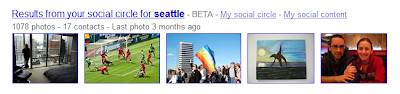
. Now when you're doing a search on Images, you may start seeing pictures from people in your social circle. These are pictures that your friends and other contacts have published publicly to the web on photo-sharing sites like Picasa Web Albums and Flickr. Just like the other social results, social image results appear under a special heading called "Results from your social circle." Here's what it looks like:
Looking at the screenshot, you may notice two new links for "My social circle" and "My social content." These links will take you to a new interface we've added where you can see the connections and content behind your social results. Clicking on "My social circle" shows your extended network of online contacts and how you're connected.
Clicking on "My social content" lists your public pages that might appear in other people's social results. This new interface should give you a peek under the hood of how Social Search builds your social circle and connects you with web content from your friends and extended network. You can check out your social circle directly by visiting this
link
. (Note that it may take some time for the connections and content to update.)
We think there's tremendous potential for social information to improve search, and we're just beginning to scratch the surface. We're leaving a "beta" label on social results because we know there's a lot more we can do. If you want to get the most out of Social Search right away, get started by creating a
Google profile
, where you can add links to your other public online social services. Check out this short video to learn more:
The new features are rolling out now on google.com in English for all signed-in users, and you should start seeing them in the next few days. Time to socialize!
Posted by Maureen Heymans, Technical Lead for Social Search, and Terran Melconian, Technical Lead for Social Image Search
Extensions, bookmark sync and more for Google Chrome
January 25, 2010
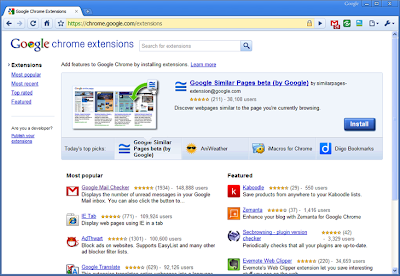
Today we're excited to introduce a new stable release of Google Chrome for Windows, which includes two of the browser's most frequently requested features: extensions and bookmark sync.
Extensions
let you add new features and functions to your browser. Some provide one-click access to some of your favorite web applications like
eBay
and
digg
, or news and information sources such as
NPR
and
Time.com
. Others are useful tweaks for performing common online tasks such as browsing photos, getting directions or shopping.
We
previously launched
extensions on the beta
channel
, and many new extensions have since been contributed by developers from all over the world. Now you can browse over 1,500 in our
extensions gallery
and install them on the stable version of Google Chrome.
Bookmark sync is a handy feature for those of you who use several computers — say, a laptop at work and a desktop at home. You can
enable bookmark sync
to synchronize your bookmarks on all of your computers so that when you create a bookmark on one computer, it's automatically added across all your computers. This means that you won't need to manually recreate the bookmark each time you switch computers.
You can read more about today's stable release — including performance improvements — on the
Google Chrome Blog
. Or if you want a look under the hood at what this update means for web developers (including new HTML and Javascript APIs), check out the
Chromium blog
.
To those using Google Chrome on Linux, extensions are enabled on the
beta channel
. And for those using Google Chrome for Mac, hang tight — we're working on bringing extensions, bookmark sync and more to the beta soon. Those currently using the stable version for Windows will be automatically updated within the next week (or you can
check for updates manually
).
If you're on a PC and haven't tried Google Chrome yet, you can
download Google Chrome
and give all these new features a whirl.
Posted by Nick Baum, Product Manager
This week in search 1/22/10
January 22, 2010
This is part of a regular series of posts on search experience updates that runs on Fridays. Look for the label
This week in search
and subscribe to the series. - Ed.
The Google that you used today is actually better than the Google that you used yesterday. On a daily basis, we make a number of algorithmic enhancements and release other search features that ultimately make finding what you're looking for quick, easy and enjoyable. Here are a few of the exciting feature releases this week:
Hours and menu information in universal search
Want to know when your favorite museum is open? Interested in ordering in and need to quickly check the menu for that restaurant around the corner? This week we were excited to launch hours and menu information in local results for universal Google search. Now you can add the words "hours" or "menu" to your search to get back the information you want in a snap.
Example searches: [
computer history museum mountain view hours
], [
sushi sakae burlingame menu
]
Rich Snippets for events
What are Rich Snippets? They show brief annotations that webmasters make to summarize what's on the page so you can see it at a glance on your search results page. So far we've launched improved snippets for two formats:
reviews
and
people
. Today, we unveiled a new Rich Snippets format for events. The next time you're searching for events, you'll see how the new format lists them as search result snippets, along with dates, locations and links directly to pages about those specific events. And, as webmasters implement the new markup on their webpages, you'll begin to see these event results more frequently.
Example search: [
concerts in san jose
]
Answer highlighting
Earlier today, we were excited to release the answer highlighting feature, which helps you get to information more quickly by delivering the likely answer to your question in boldface type right in search results. If the pages returned for these searches contain a simple answer to a factual-based search, the snippet will more often include the relevant text in boldface for easy reference. Read more about answer highlighting
here
.
Example searches: [
who is the author of 1984
], [
p.s. i love you release date
], [
terminator salvation director
]
We hope that you enjoy the features we launched this week — and that they make your search experience even better than yesterday.
Posted by Johanna Wright, Director of Product Management, Search
Write better knols with object embedding and PicApp
January 22, 2010
During the past couple months, the Knol team has been steadily adding improved tools to help you create better knols. Most notably, we've greatly expanded the number of
embeddable objects
to help you make your knols more graphical and interactive. We've been excited by the many uses we're seeing, and today we have one more to add to the list: PicApp.
We think it's important for a publishing platform like knol to provide people with the best possible tools for expression, so we've quietly added a large number of new embeddable objects for maps, docs, spreadsheets, forms, slideshows, presentations, videos,
gadgets
and more. Embeddable objects help you make better knols. For example, our equation object helps you add richly formatted mathematical expressions right in your knols. We really liked the cleanly embedded equations in
this knol
from the Public Library of Science. Similarly, our calendar object enables you to easily share details about upcoming dates, like
swing dance lessons
in Oregon.
Even with all these embeddable objects, there's still more to do. For example, one frequent complaint is that it is still difficult today to find appropriately licensed, high-quality imagery to include in your articles. To help solve this problem, we've worked with
PicApp
to add 10 million high quality stock images via our improved picture picker. The new picker enables you to search for creative and editorial images from PicApp's comprehensive, high-quality stock imagery repositories such as Getty Images. The service and use of the images is free.
Below is a snapshot of a sample search using the PicApp search API.
The feature just launched last month, and several authors have already made use of this new capability to strengthen their writings. For example,
this knol about Gary McKinnon
uses images found via PicApp, along with embedded videos, and even a feedback form to get input from the audience.
We hope you enjoy the image picker and other new embeddable objects. As always, you can read our
release notes
for a full list of new features.
Posted by Cedric Dupont, Product Manager
Labels
Africa
19
Android
58
April 1
4
Asia
39
Europe
46
Latin America
18
accessibility
41
acquisition
26
ads
131
apps
418
books + book search
48
commerce
12
computing history
7
crisis response
33
culture
12
developers
120
diversity
35
doodles
68
education and research
144
entrepreneurs at Google
14
faster web
16
free expression
61
google.org
73
googleplus
50
googlers and culture
202
green
102
maps and earth
194
mobile
124
online safety
19
open source
19
photos
39
policy and issues
139
politics
71
privacy
66
recruiting and hiring
32
scholarships
31
search
505
search quality
24
search trends
118
security
36
small business
31
user experience and usability
41
youtube and video
140
Archive
2016
Nov
Oct
Sep
Aug
Jul
Jun
May
Apr
Mar
Feb
Jan
2015
Dec
Nov
Oct
Sep
Aug
Jul
Jun
May
Apr
Mar
Feb
Jan
2014
Dec
Nov
Oct
Sep
Aug
Jul
Jun
May
Apr
Mar
Feb
Jan
2013
Dec
Nov
Oct
Sep
Aug
Jul
Jun
May
Apr
Mar
Feb
Jan
2012
Dec
Nov
Oct
Sep
Aug
Jul
Jun
May
Apr
Mar
Feb
Jan
2011
Dec
Nov
Oct
Sep
Aug
Jul
Jun
May
Apr
Mar
Feb
Jan
2010
Dec
Nov
Oct
Sep
Aug
Jul
Jun
May
Apr
Mar
Feb
Jan
2009
Dec
Nov
Oct
Sep
Aug
Jul
Jun
May
Apr
Mar
Feb
Jan
2008
Dec
Nov
Oct
Sep
Aug
Jul
Jun
May
Apr
Mar
Feb
Jan
2007
Dec
Nov
Oct
Sep
Aug
Jul
Jun
May
Apr
Mar
Feb
Jan
2006
Dec
Nov
Oct
Sep
Aug
Jul
Jun
May
Apr
Mar
Feb
Jan
2005
Dec
Nov
Oct
Sep
Aug
Jul
Jun
May
Apr
Mar
Feb
Jan
2004
Dec
Nov
Oct
Sep
Aug
Jul
Jun
May
Apr
Feed
Google
on
Follow @google
Follow
Give us feedback in our
Product Forums
.






 Follow
