We've moved!
Check out News from Google
for all the latest updates.
Official Blog
Insights from Googlers into our products, technology, and the Google culture
(More) Historically Black Colleges and Universities go Google
August 19, 2011
Across the United States,
Historically Black Colleges and Universities
(HBCUs) provide educational homes for hundreds of thousands of African-American students. Small and community-focused, usually with fewer than 5,000 students, privately or publicly funded, and far-reaching in curriculum and tradition, these communities share a proud history of addressing educational equality and preparing many of the nation’s minority students for whatever life opportunities they seek.
Last week, at our annual
HBCU Faculty Summit
in our New York City office, we had the chance to host more than 50 professors and administrators from 16 HBCUs across the country. The 2011 summit had three themes: infrastructure, curriculum and partnership. We were pleased to lead thoughtful conversations around these themes and discuss the benefits Google Apps can bring to a campus. The summit also provided a unique opportunity for representatives from different HBCUs to come together and learn from one another.
Click here to view photos
from the Faculty Summit.
On the first day of the summit, nine HBCUs announced their decision to switch to
Google Apps for Education
. These schools included:
Alcorn State University
Bethune Cookman College
Jarvis Christian College
Morgan State University
Morris Brown College
North Carolina A&T State University
Philander Smith College
Saint Paul College
Wilberforce University
These schools joined another 13 HBCUs already using Google Apps, meaning that more than 100,000 HBCU students and faculty will have access to Google’s collaboration tools in the 2011-2012 school year.
Like all universities, HBCUs rely on technology like Apps to facilitate communication, collaboration and connectedness among their students, staff and alumni. To learn more about HBCUs turning to Google Apps to transform campus technology while cutting costs, read
this white paper
and today’s
Enterprise Blog post
about North Carolina A&T going Google. If you’re an administrator or ambassador at an HBCU and would like to go Google, visit the
Google Apps for Education website
and click on “Get Apps today.”
Posted by LaFawn Bailey, Global Diversity & Inclusion Specialist
Rain or shine, see the weather in Google Maps
August 18, 2011
(Cross-posted on the
LatLong blog
)
Whether you’re organizing a trip overseas or a picnic at a local park, knowing the weather forecast is a crucial part of the planning process. Today, we’re adding a weather layer on
Google Maps
that displays current temps and conditions around the globe, and will hopefully make travel and activity planning easier.
To add the weather layer, hover over the widget in the upper right corner of Google Maps and select the weather layer from the list of options. When zoomed out, you’ll see a map with current weather conditions from
weather.com
for various locations, with icons to denote sun, clouds, rain and so on. You can also see cloud coverage, thanks to our partners at the
U.S. Naval Research Lab
. And, if you look closely, you can also tell if it’s day or night around the world by sun and moon icons.
Enabling the weather layer also gives you an instant weather report for friends and family living around the world. For example, it looks like my family in London isn’t experiencing the best summer weather right now:
Weather near London, UK
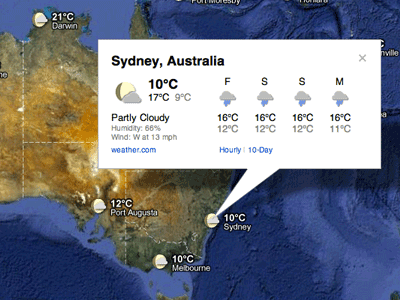
Clicking on the weather icon for a particular city will open an info window with detailed data like current humidity and wind conditions, as well as a forecast for the next four days. Below is the upcoming forecast for my location in wintertime Sydney, which seems to have the similar weather as London!
Weather near Sydney, Australia in satellite view
Changing the units of wind speed (Mph/KMph/Mps) and temperature (F/C), and enabling or disabling the clouds (when you’re zoomed out), can also be done from the left-hand panel.
Weather left hand panel
Get started now and check out the weather layer
here
.
Posted by Jonah Jones, User Experience Designer
Magnifier: Taking a closer look at great music
August 17, 2011
Three months ago at Google I/O
we launched
Music Beta
, a service that lets you upload your personal music collection to the cloud and listen to it on the web or your Android phone or tablet. Since the beginning, our goal has been to help you fall in love with your music all over again, and now we’re taking that idea one step further.
Today we introduced
Magnifier
, a new music discovery site that will keep your collection growing. Magnifier will feature great music and the people who make it, including videos of live performances, interviews with artists, explorations of different musical genres and free songs that you can add to your Music Beta collection.
The featured artist on Magnifier this week is Grammy-nominated indie rock band
My Morning Jacket
. We’re giving away two of their tracks to Music Beta users, one of which is an exclusive to Magnifier: a live performance of “The Day is Coming.” To get these free tracks and hundreds of other songs in our Free Song Archive, you need a Music Beta by Google account (if you don’t have an account,
request an invitation
). Head over to
Magnifier
, find the songs you want, click on the “Add free music” buttons and the tracks will be instantly added to your library in Music Beta.
Stop by Magnifier regularly to get the free Song of the Day and reignite your passion for music.
Posted by Paul Joyce, Product Manager for Music Beta
Street View goes to the Amazon
August 17, 2011
With
Google Street View
, you can do amazing things such as
hike around Stonehenge
or even
ski down Whistler’s slopes
—all without leaving home. Soon, you’ll be able to float down the Amazon and Rio Negro Rivers of northwest Brazil and experience some of the most remote and biodiverse areas in the world.
A few members of our Brazil and U.S. Street View and
Google Earth Outreach
teams are currently in the Amazon rainforest using our Street View technology to capture images of the river, surrounding forests and adjacent river communities. In partnership with the
Amazonas Sustainable Foundation (FAS)
, the local non-profit conservation organization that invited us to the area, we’re training some of FAS’s representatives on the imagery collection process and leaving some of our equipment behind for them to continue the work. By teaching locals how to operate these tools, they can continue sharing their points of view, culture and ways of life with audiences across the globe.
We’ll pedal the
Street View trike
along the narrow dirt paths of the Amazon villages and maneuver it up close to where civilization meets the rainforest. We’ll also mount it onto a boat to take photographs as the boat floats down the river. The tripod—which is the same system we use to capture
imagery of business interiors
—will also be used to give you a sense of what it’s like to live and work in places such as an Amazonian community center and school.
Image of the Tumbira community in the Rio Negro Sustainable Development Reserve
In this first phase of the project, the Google and FAS teams will visit and capture imagery from a 50km section of the Rio Negro River, extending from the Tumbira community near Manaus—the capital of the state of Amazonas—to the Terra Preta community. We’ll then process the imagery of the river and the communities as usual, stitching the still photos into 360-degree panoramics.
Image of the Tumbira Community
For many outdoor enthusiasts, travelers and environmentalists, this creates an opportunity to experience the wonders of the Amazon, which will be accessible in a way they’d previously only dreamed about. We’re honored to work with FAS on this project to bring the Amazon online for those who can’t visit in person, and help our partners share with the world the unique stories of its inhabitants and the beauty of this place they call home.
View Larger Map
Click the above album for more photos of our team's work in the Amazon, and the communities with which they're working.
Update 8/18/11:
We've added a photo album to this post.
Posted by Karin Tuxen-Bettman, Google Earth Outreach, and Karina Andrade, Google Street View
Building a healthier, greener Google
August 17, 2011
(Cross-posted on the
Green blog
)
This is the first in a short series of posts and videos spotlighting our efforts to make Google greener. In this post, we give you a glimpse at our green buildings. -Ed.
When it comes to greening our office buildings, we apply the same focus that we use for any of our products: put the user first. We want to create the healthiest work environments possible where Googlers can thrive and innovate. From concept through design, construction and operations, we create buildings that function like living and breathing systems by optimizing access to nature, clean air and daylight.
Since I arrived at Google in 2006, I’ve been part of a team working to create life-sustaining buildings that support the health and productivity of Googlers. We avoid materials that contain volatile organic compounds (
VOCs
) and other known toxins that may harm human health, so Googlers don’t have to worry about the air they’re breathing or the toxicity of the furniture, carpet or other materials in their workspaces. We also use dual stage air filtration systems to eliminate particulates and remaining VOCs, which further improves indoor air quality.
Since building materials don’t have ingredient labels, we’re pushing the industry to adopt product transparency practices that will lead to real market transformation. In North America, we purchase materials free of the
Living Building Challenge Red List Materials
and
EPA Chemicals of Concern
, and through the
Pharos Project
we ask our suppliers to meet strict transparency requirements.
We also strive to shrink our environmental footprint by investing in the most efficient heating, cooling and lighting systems. Throughout many of our offices, we’ve performed energy and water audits and implemented conservation measures to develop best practices that are applied to our offices worldwide. To the extent possible, we seek out renewable sources for the energy that we do use. One of the earliest projects I worked on at Google involved
installing the first solar panels on campus
back in 2007. They have the capacity to produce 1.6 megawatts of clean, renewable electricity for us, which supplies about 30 percent of our peak energy use on the buildings they cover.
With a little healthy competition, we’ve gotten Google’s offices around the world involved in greening our operations. Our internal Sustainable Pursuit program allows teams to earn points based on their office’s green performance—whether it’s through green cleaning programs, water efficiency or innovative waste management strategies. We use Google Apps to help us track progress toward our goals—which meet or exceed the U.S. Green Building Council’s
LEED
standards—and share what we’ve learned among our global facilities teams.
We’re proud of our latest LEED Platinum achievement for the interior renovation of an office building at the Googleplex. While we have other LEED Platinum buildings in our portfolio, it’s a first for our headquarters and a first for the City of Mountain View. The interior renovation was designed by Boora Architects and built by XL Construction, using healthy building materials and practices. In fact, we now have more than 4.5 million square feet of building space around the world on deck to earn LEED Certification.
Looking ahead, our team will have many more opportunities to redefine how we green our buildings and workspaces. It’s a win for Googlers, our business and the environment.
Posted by Anthony Ravitz, Green Team Lead, Real Estate & Workplace Services
The evolution of sitelinks: expanded and improved
August 16, 2011
(
Cross-posted on the
Inside Search blog
)
When you’re searching, you often have a specific task in mind, like figuring out which exhibits are showing at a nearby museum. Despite this narrow goal, people often start with a broad query, like [
metropolitan museum of art
], with no mention of exhibits. For these searches, the first result may include a list of links to specific sections of the site, which are called “
sitelinks
.” Today, we’re launching several improvements to sitelinks, including the way they look and are organized in search results.
Sitelinks before today’s change
s
Sitelinks have been around for a while, but when we
first launched them
years ago, they were much more limited—a single row of just four links:
It turns out that sitelinks are quite useful because they can help predict which sections of the site you want to visit. Even if you didn’t specify your task in the query, sitelinks help you quickly navigate to the most relevant part of the site, which is particularly handy for large and complex websites. Sitelinks can also give you a good overview of a website's content, and let webmasters expose areas of the site that visitors may not know about.
As it became clear how valuable sitelinks were, we continued to improve their appearance and quality. We rearranged them into a column of links to make them easier to read. We
doubled the number of links
, creating direct access to more of the site. We
started showing sitelinks
for more results and we continuously made improvements to the algorithms that generate and rank the links. With each of these changes, people used sitelinks more and more.
That brings us to today’s launch. Sitelinks will now be full-size links with a URL and one line of snippet text—similar to regular results—making it even easier to find the section of the site you want. We’re also increasing the maximum number of sitelinks per query from eight to 12.
Improved sitelinks with URLs and snippet text
In addition, we’re making a significant improvement to our algorithms by combining sitelink ranking with regular result ranking to yield a higher-quality list of links. This reduces link duplication and creates a better organized search results page. Now, all results from the top-ranked site will be nested within the first result as sitelinks, and all results from other sites will appear below them. The number of sitelinks will also vary based on your query—for example, [
museum of art nyc
] shows more sitelinks than [
the met
] because we’re more certain you want results from
www.metmuseum.org
.
These changes will be rolling out globally over the next few days in all supported languages to anyone using a modern browser, such as Chrome, Firefox or IE 7 and above. We hope these changes make it easier and faster for you to reach the information you need.
Posted by Daniel Rocha, Software Engineer, Sitelinks Team
Find more while you browse with Google Related
August 16, 2011
(Cross-posted on the
Inside Search blog
and the
Chrome blog
)
Almost every time I go online, I come across some new topic or item that I’d like to learn more about. Sometimes it’s as simple as the latest buzz on the new shop down the street. Other times it’s something more significant, like a counterpoint to an opinion piece I’m reading. While the answer can be just a simple search away, we wanted to find a way to get some of those answers to you even faster. Now with
Google Related
, a new
Chrome Extension
and
Google Toolbar
feature, you’ll automatically see interesting content relevant to what’s on the page you’re viewing, right where you’re viewing it.
Whether you’re reading a news article, shopping for a new pair of shoes or visiting your favorite musician’s website, Google Related works in the background to find you the most interesting and relevant content on the topics you’re currently viewing. For example, if you visit a restaurant’s website, Related can show you a map, reviews from Google Places, mentions from across the web and other similar eateries that you might want to try.
Results will display in a thin bar at the bottom of your screen, and will remain minimized until you hover over them with your mouse. Once selected, they'll open up immediately in your browser window, saving you the trouble of having to open multiple new windows or tabs. If Google Related shows you something you’re interested in, you can let others know using the built-in +1 button.
In order to offer you relevant suggestions, Related sends the URL and other available information about the pages you visit back to Google. If you’re interested in how that data is used and stored, you can learn more
here
and
here
.
If you decide you’d rather not see the Related bar, you can easily hide it for specific pages and sites through the Options menu. If you use Related as part of Google Toolbar, you can disable Related entirely through the Options menu as well.
Google Related is available both as a Chrome Extension in the
Chrome Web Store
and as a new feature in Google Toolbar for Internet Explorer. Visit
www.google.com/related
to learn more and to get Google Related today.
Posted by Ran Ben-Yair, Product Manager, Google Related Team, Israel R&D Center
Labels
Africa
19
Android
58
April 1
4
Asia
39
Europe
46
Latin America
18
accessibility
41
acquisition
26
ads
131
apps
418
books + book search
48
commerce
12
computing history
7
crisis response
33
culture
12
developers
120
diversity
35
doodles
68
education and research
144
entrepreneurs at Google
14
faster web
16
free expression
61
google.org
73
googleplus
50
googlers and culture
202
green
102
maps and earth
194
mobile
124
online safety
19
open source
19
photos
39
policy and issues
139
politics
71
privacy
66
recruiting and hiring
32
scholarships
31
search
505
search quality
24
search trends
118
security
36
small business
31
user experience and usability
41
youtube and video
140
Archive
2016
Nov
Oct
Sep
Aug
Jul
Jun
May
Apr
Mar
Feb
Jan
2015
Dec
Nov
Oct
Sep
Aug
Jul
Jun
May
Apr
Mar
Feb
Jan
2014
Dec
Nov
Oct
Sep
Aug
Jul
Jun
May
Apr
Mar
Feb
Jan
2013
Dec
Nov
Oct
Sep
Aug
Jul
Jun
May
Apr
Mar
Feb
Jan
2012
Dec
Nov
Oct
Sep
Aug
Jul
Jun
May
Apr
Mar
Feb
Jan
2011
Dec
Nov
Oct
Sep
Aug
Jul
Jun
May
Apr
Mar
Feb
Jan
2010
Dec
Nov
Oct
Sep
Aug
Jul
Jun
May
Apr
Mar
Feb
Jan
2009
Dec
Nov
Oct
Sep
Aug
Jul
Jun
May
Apr
Mar
Feb
Jan
2008
Dec
Nov
Oct
Sep
Aug
Jul
Jun
May
Apr
Mar
Feb
Jan
2007
Dec
Nov
Oct
Sep
Aug
Jul
Jun
May
Apr
Mar
Feb
Jan
2006
Dec
Nov
Oct
Sep
Aug
Jul
Jun
May
Apr
Mar
Feb
Jan
2005
Dec
Nov
Oct
Sep
Aug
Jul
Jun
May
Apr
Mar
Feb
Jan
2004
Dec
Nov
Oct
Sep
Aug
Jul
Jun
May
Apr
Feed
Google
on
Follow @google
Follow
Give us feedback in our
Product Forums
.






 Follow
